r1-alpha5 — Early Access

Renzora Engine

Powered by Rust & Bevy 0.18

The first fully-featured game engine built on Bevy — a complete visual editor, scripting, physics and real-time rendering, engineered in Rust and fully open source.

MIT / Apache 2.0~187 workspace cratesLua · Rhai · Blueprints6 export platforms
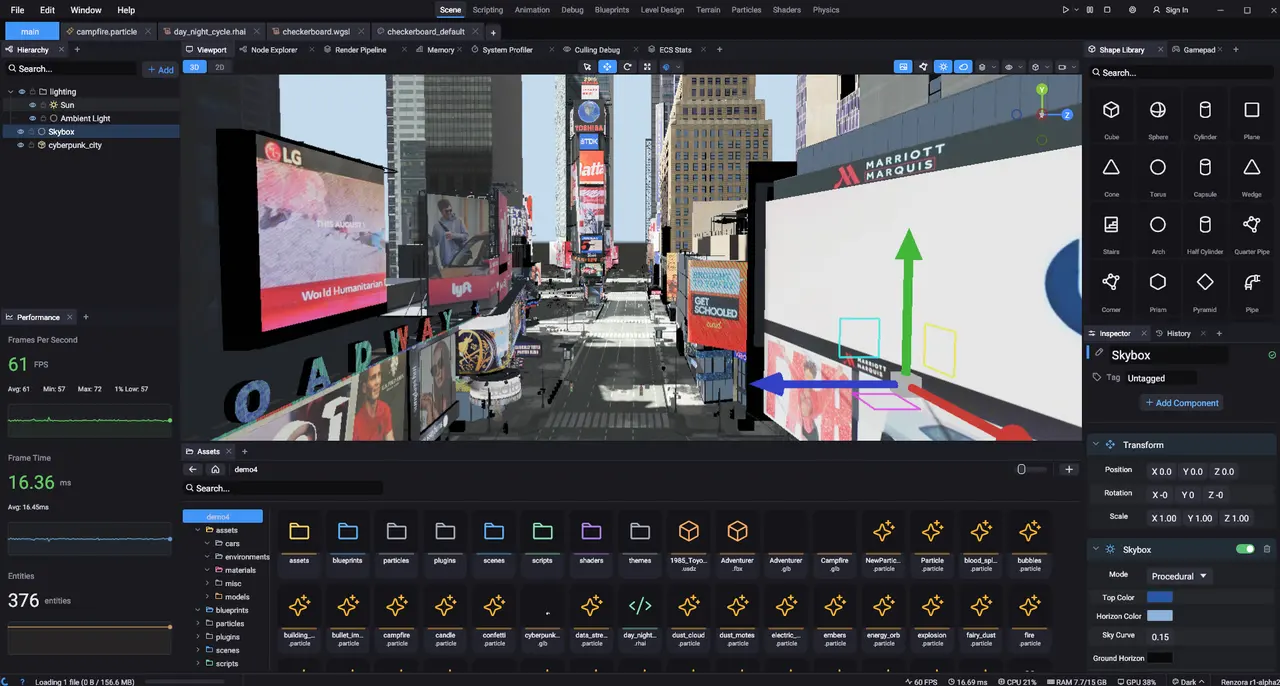
The Renzora editor with a Times Square scene, hierarchy, inspector and asset browser

Build real-time 3D worlds in one professional editor — hierarchy, transform gizmos, a reflection-driven inspector and a live performance panel, side by side.

Everything in one editor

Eight systems, one engine

Not a thin wrapper — a full production toolkit, with almost every feature shipping as its own plugin.

Scene Editor

Dockable panels, nested hierarchy, and a reflection-driven inspector with custom components.

Scripting

Lua 5.4 and Rhai chosen by file extension, plus visual Blueprint node graphs.

Plugin System

Almost every feature is a plugin — hot-load cdylibs into plugins/ with renzora::add!.

Physics

Rigid bodies, colliders and queries powered by the Avian physics engine.

Materials & Shaders

Node-based PBR material graph, custom WGSL, and 50+ post-process effects.

Ember UI

Build game and editor UI from .html templates with reactive bindings.

Cross-Platform

Export to Windows, Linux, macOS, Android, iOS and the Web.

Debugging

An 11-panel debugger — profiler, memory, ECS, render and physics stats.

Under the hood

A complete engine, engineered in Rust

No glue scripts, no bolted-on runtimes. Every system below ships today, built on Rust and Bevy 0.18.

Scene Editor

A reflection-driven editor that understands your types

Compose scenes across up to four viewports with transform gizmos, organize everything in a nested hierarchy, and edit any component in an inspector generated straight from your Rust types. Derive Inspectable on your own structs and they show up — fully editable and serialized with the scene.

Custom componentsUp to 4 viewportsTransform gizmos
The inspector showing a World Environment with transform, directional light, volumetric light and TAA components

The inspector stacks a World Environment's components — transform, directional light, volumetric god rays and TAA.

Real-Time Rendering

Bevy's renderer, tuned for beautiful real-time scenes

Physically based shading, dynamic lighting and Lumen global illumination render your worlds as you build them. Light a moody neon cafe, a rain-slick street or a daytime cityscape and iterate live in the viewport — what you see is what ships.

PBR shadingLumen GILive viewport
A cinematic render of a Parisian cafe street with a blue scooter selected

A Parisian cafe street rendered in the viewport, with a single scooter selected and warm atmospheric lighting.

Scripting

Script in Lua, Rhai or visual Blueprints

Write gameplay logic in a built-in editor with full syntax highlighting. Renzora picks the runtime from the file extension — Lua 5.4 or Rhai — and visual Blueprint node graphs cover the same ground without code. Hook into lifecycle callbacks like on_update and drive entities directly.

Lua 5.4RhaiBlueprint graphs
The built-in code editor with several Lua scripts open, showing car_physics.lua

The built-in editor with several Lua scripts open — car_physics.lua handling steering, throttle, brake and handbrake input.

Plugin Architecture

Almost everything is a plugin

Renzora is built from roughly 187 workspace crates, and nearly every feature — from the material graph to the audio mixer — ships as its own plugin. Distribution plugins are hot-loadable cdylibs: drop one into plugins/, register it with renzora::add!, and it appears in the editor.

~187 cratesHot-loadable cdylibsrenzora::add!
The Add Panel browser listing dockable panels grouped by category

The Add Panel browser — dockable panels grouped by Blueprint, Debug, Audio, Material, Particle, Scripting, Shader, Terrain and more.

Physics & Worlds

Populate your world, then bring it to life with Avian

Spawn lights, cameras, terrain, splines and 2D nodes from one searchable Add Entity menu — physics bodies included. The Avian physics engine drives rigid bodies, colliders and queries, with a dedicated physics debug view for when you need to see the simulation.

Avian physicsRigid bodies & collidersSearchable palette
The Add Entity menu with a category sidebar and a list of entity types including physics

The Add Entity menu — lights, cameras, terrain, 2D nodes and physics, all in one searchable list.

Materials & Shaders

Author PBR materials as a graph — or drop down to WGSL

Wire texture, normal-map and math nodes into a Surface Output exposing base color, metallic, roughness, normal, emissive, AO, clearcoat, anisotropy and more. Need full control? Write custom WGSL shaders and stack over fifty post-process effects on top.

Node graphCustom WGSL50+ post effects
A node-based material editor wiring texture and normal-map nodes into a PBR surface output

Sample Texture and Sample Normal Map nodes wired into a full PBR Surface Output.

Ember UI

Markup-driven UI for your game and the editor itself

Renzora's Ember system builds interfaces from .html templates with reactive double-brace bindings — the same system powers in-game screens and the editor's own panels. Design a match lobby or a HUD visually, point it at an HTML template and a UI layout, then bind it to scripts.

.html templatesReactive bindingsGame + editor UI
The in-engine UI builder editing a match-lobby screen with HTML Template fields in the inspector

The in-engine UI builder editing a match-lobby screen, with HTML Template and UI Layout exposed in the inspector.

Debugging & Profiling

Eleven debug panels, a console and a command palette

Profile in real time with FPS, frame timing, memory and render stats, then dig into ECS stats, physics and culling debug, Lumen GI and scripting diagnostics — eleven panels in all. A filterable console with categorized logs and a command palette round out the toolkit.

11 debug panelsLive graphsConsole & palette
The editor with a dense row of diagnostic panels: performance, system, render stats, memory and physics debug

Live diagnostics docked across the bottom — Performance, System, Render Stats, Memory, Physics and Camera debug, with graphs.

Cross-Platform Export

One project. Six platforms.

Build once and export to desktop, mobile and the browser — Windows, Linux, macOS, Android, iOS and the Web via WebAssembly.

Windows
Linux
macOS
Android
iOS
Web (WASM)
Inside the editor

More of the toolkit

Hierarchy, audio mixing, the Hub Store, the asset browser and the console — every panel is real and dockable.

0
Workspace Crates
0
Export Platforms
0
Ways to Script
0
Debug Panels
0
Max Viewports
0
Post Effects

Build it in Renzora

Download the open-source engine and spin up your first scene in minutes.